2 November 2026
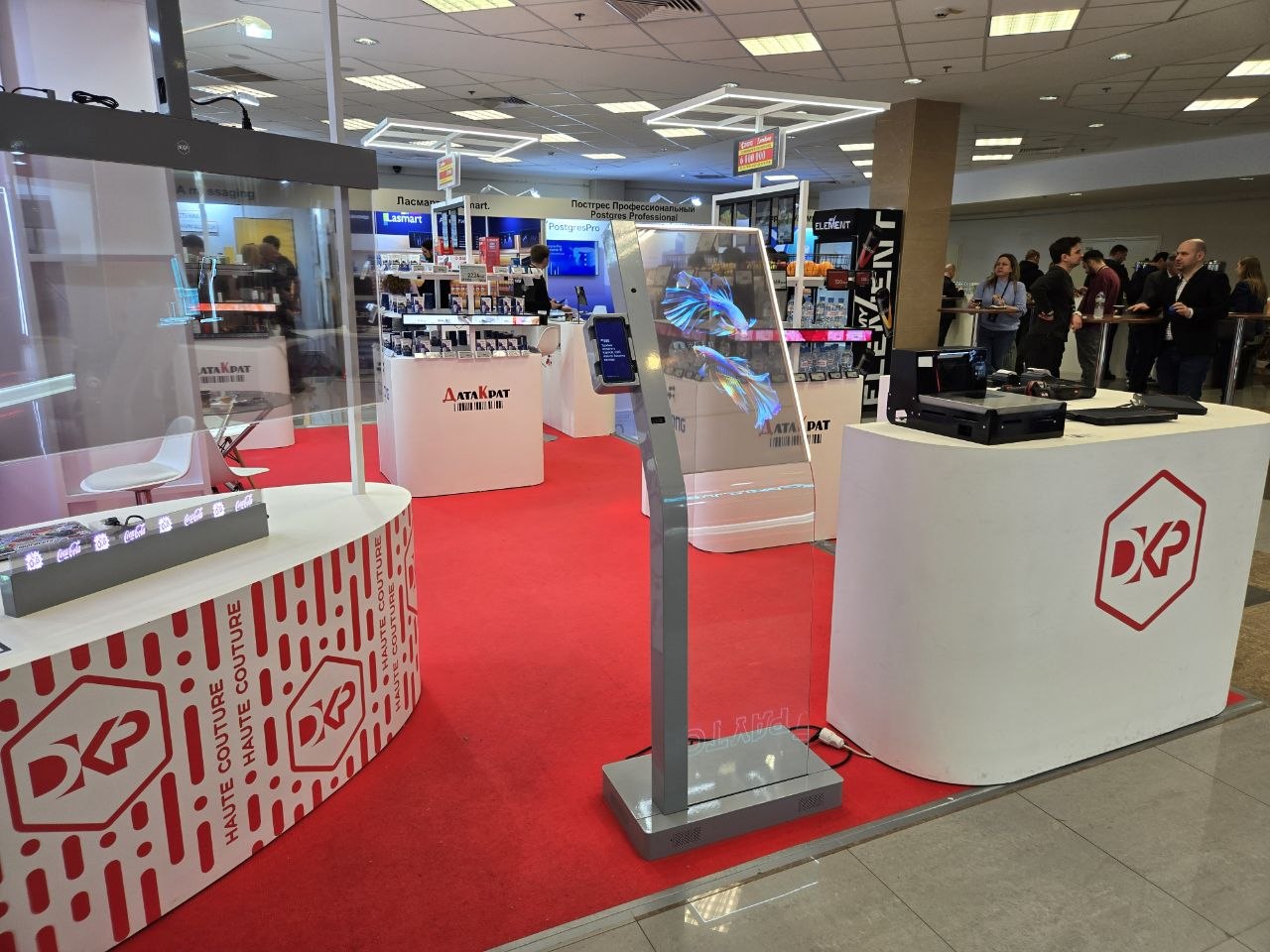
At the 2026 Russian Retail Show and Retail TECH Expo, Data-Krat showcased a self-checkout kiosk built around the DKP Vision Point 30. Its large transparent display presented products and the checkout interface, while a smart PIN pad running MST Company's JoinPOS software handled payment processing. MST's JoinPROTO integration protocol enabled the checkout application and payment terminal to exchange data.
The Challenge
The challenge was to connect the DKP Vision Point 30 checkout application, running on a large transparent display, to a separate smart PIN pad. Using JoinPROTO and its software development kit (SDK), the kiosk needed to send a payment request and the purchase amount to the terminal, receive the transaction result, and display it in its own interface.
From the shopper's perspective, the two devices needed to work as one checkout system. The customer selects a product, proceeds to payment, and receives confirmation when the transaction is complete. The separate hardware and software components behind those steps should be invisible to the shopper.
MST Company's role was to integrate the payment functionality using JoinPOS and JoinPROTO.
The Hardware
The centerpiece of the demonstration was the DKP Vision Point 30, a freestanding kiosk with a 30-inch transparent OLED touchscreen. According to the manufacturer, the panel offers 43% transparency. Images appear to float in midair, while the booth and its surroundings remain visible through the display. The design also allows hardware manufacturers to experiment with the kiosk's enclosure, screen, and component placement while keeping the checkout and payment functions connected.
Display Specifications
30″30-inch touchscreen
OLEDOLED display technology
43%43% panel transparency (manufacturer-reported)
At the show, the screen displayed animations, product information, and the checkout interface. Its distinctive design attracted considerable attention at the booth. For visitors in Russia, where this type of self-checkout kiosk was still new, it offered a glimpse of how in-store checkout hardware might evolve.
The smart PIN pad was mounted on the side of the main panel. This kept the transparent display unobstructed while placing the payment device within easy reach of customers. The PIN pad ran JoinPOS software.
Note: The display specifications above are based on information provided by DKP.
The Software
MST Company supplied JoinPOS, its cross-platform payment terminal software. JoinPOS is designed to run payment workflows on devices from multiple hardware manufacturers and connect those terminals to point-of-sale (POS) systems.
JOINPOS CAPABILITIESPayment Methods Supported by JoinPOS
- Bank cards
- Russia’s Faster Payments System (SBP)
- Digital ruble
- Volna
- Biometric payments
These are capabilities of the JoinPOS platform; not all of these payment methods were necessarily demonstrated at the exhibition.
JoinPROTO connected the checkout application to the payment terminal. The protocol supports communication between POS software and payment devices, and its SDK is designed to make integration easier. In the Vision Point 30 demonstration, JoinPROTO connected the kiosk's checkout application to the smart PIN pad running JoinPOS.
How the Integration Works
Two devices, one checkout experience: The Vision Point 30 checkout application exchanges information with a JoinPOS-powered smart PIN pad through JoinPROTO.
KIOSK ↔ PROTOCOL ↔ TERMINAL
JoinPOS + JoinPROTO
Two devices. One checkout experience.
Vision Point 30Checkout application
JoinPROTO
Payment request and amount
Transaction result
Smart PIN padJoinPOS software
Step 1. The Shopper Selects a Product
The checkout application displays the product and its price. When the shopper proceeds to payment, the application sends a payment request and the purchase amount to the PIN pad through JoinPROTO.
Step 2. Payment Moves to the PIN Pad
When the terminal receives the request, it starts the payment process on its own screen. The transparent display does not need to duplicate the PIN pad's interface or handle payment processing itself. Keeping payment interactions on a dedicated device helps make the checkout experience straightforward for shoppers.
Step 3. The Result Returns to the Kiosk
The integration relies on two-way communication. The checkout application initiates payment and sends the amount to the terminal. Once the terminal processes the transaction, it returns the result to the checkout application, which updates the kiosk interface and shows the appropriate message to the shopper.
Illustration of the components used in the exhibition demonstration.
Automatically transferring the amount is especially important in self-checkout. Neither the shopper nor an employee needs to enter the total again on the terminal or manually start the payment. The payment request stays tied to the purchase in progress.
The return message is just as important. Initiating a payment is not enough: the checkout application needs the transaction result before it can complete the checkout flow appropriately. JoinPROTO handles the exchange, while the shopper moves through a connected sequence of steps across the two screens.
What Visitors Saw at the Booth
The kiosk's transparent display showed a product card, its price, and a purchase button. When a shopper proceeded to payment, the adjacent smart PIN pad running JoinPOS displayed the amount and prompted the shopper to pay. The checkout interface remained on the large screen.
The final step was visible on the kiosk as well: the display showed a “Payment successful!” message and an image of a receipt with a QR code. The demonstration connected three parts of the experience: selecting a product on the kiosk, completing the payment on the terminal, and seeing the result in the checkout application.
For a trade-show demonstration, that was an important detail. Visitors could see not only the transparent screen's visual appeal, but also how the kiosk worked with a dedicated payment terminal.
A short video filmed at Data-Krat's booth on April 21, 2026, also documented the demonstration.
Conclusion
We enjoyed working with the team at Data-Krat. Integrating payments into the DKP Vision Point 30 was an engaging technical project and a productive collaboration. We look forward to using DKP equipment in future projects.